
Download TINACloud – Electronics, TINA Circuit, TINA Tool, TINA Software
Overview
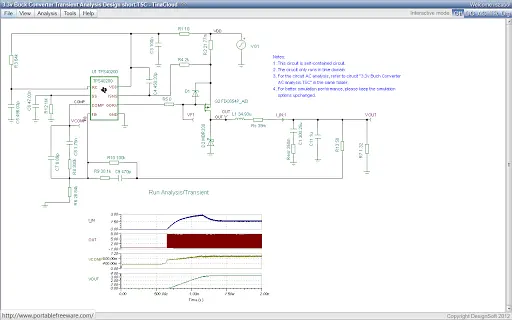
TINACloud is a cloud-based, multi-language circuit simulation platform that brings the capabilities of the renowned TINA software directly into your web browser. Designed for both professionals and educators, it enables users to analyze and design complex electronic circuits without requiring installation or local setup. The software supports a broad spectrum of circuit types, including analog, digital, VHDL, microcontroller (MCU), and mixed-signal designs.
It is particularly suited for advanced applications such as switched-mode power supplies (SMPS), radio frequency (RF) circuits, communication systems, and optoelectronic components. With its browser-based architecture, TINACloud allows engineers and students to access their projects from any device with an internet connection, making it ideal for remote collaboration and distance learning environments. The platform is tailored to meet the needs of electrical engineers seeking a high-performance simulation tool and educators who require a scalable solution for classroom instruction and virtual labs.
The developer, TINA Software Inc., has a history of delivering robust engineering tools, and this cloud version extends their legacy into modern, accessible technology.
Key Features & Capabilities
- Browser-Based Simulation – Run full-featured circuit simulations directly in your web browser, eliminating the need for installation or local hardware requirements.
- Multi-Language Support – Access the interface and documentation in multiple languages, enhancing usability for international users and educational institutions.
- Comprehensive Circuit Analysis – Perform detailed analysis on analog, digital, mixed-signal, VHDL, MCU, SMPS, RF, communication, and optoelectronic circuits.
- Cloud Project Storage – Save and retrieve projects securely in the cloud, enabling seamless access across devices and locations.
- Collaborative Design Environment – Share circuits and simulations with peers, instructors, or team members for real-time feedback and joint development.
- Real-Time Simulation & Visualization – View results instantly with dynamic waveform displays and interactive component behavior.
These features support practical workflows such as designing a power supply circuit in a remote engineering course, simulating a microcontroller interface in a virtual lab, or validating a communication system’s performance before physical prototyping. The cloud infrastructure ensures consistent performance regardless of local system limitations, allowing users to focus on design rather than configuration.
User Interface, Workflow & Performance
The user interface of TINACloud is structured around a clean, intuitive layout optimized for circuit design and analysis. Navigation is handled through a central toolbar, component palette, schematic editor, and simulation control panel. The workflow begins with creating a new schematic, placing components from the library, connecting them, and running simulations with a single click.
The real-time feedback during simulation helps users quickly identify issues and refine their designs. The browser-based nature of the software ensures consistent UI behavior across platforms. While exact performance metrics were not specified, the platform is designed to handle complex simulations efficiently in a cloud environment.
The developer did not provide detailed information on CPU or RAM usage, but the cloud execution model suggests that local resource consumption remains minimal. Stability is expected to be high due to centralized infrastructure, though network reliability may influence responsiveness. General software behavior patterns indicate that the application remains responsive even during extended sessions.
Compatibility & System Requirements
TINACloud is compatible with Windows, Mac, and Linux operating systems, offering broad accessibility across desktop platforms. As a cloud-based application, it does not require local installation, which simplifies deployment and reduces dependency on specific hardware configurations. The application size is reported as 25 MB, though this likely refers to the client-side footprint or cached assets rather than a traditional installable package.
The software runs entirely within modern web browsers, meaning compatibility depends on browser support for current web standards such as WebGL and WebAssembly. The developer did not specify exact system requirements, but users can expect minimal local resource usage since processing occurs remotely. Platform compatibility information is limited to the listed operating systems, with no mention of mobile or tablet support.
The latest version, 2.0, includes enhancements to simulation accuracy and user experience, though specific changes were not detailed.
Pros and Cons
Pros
- Runs directly in the browser – no installation required
- Accessible from any device with internet access
- Supports advanced circuit types including SMPS, RF, and MCU
- Cloud-based project storage for easy collaboration
- Multi-language interface improves global usability
- Free to use with no cost barrier for students and educators
Cons
- Requires a stable internet connection for full functionality
- Performance may vary based on network speed and latency
- Limited offline access for project editing
- Exact system requirements were not listed
- Dependent on third-party browser performance and updates
FAQ Section
Is TINACloud compatible with all web browsers?
TINACloud is designed to work with modern web browsers that support WebGL and WebAssembly. While the developer did not specify exact browser compatibility, users should ensure their browser is up to date for optimal performance.
Can I use TINACloud offline?
Due to its cloud-based architecture, TINACloud requires an active internet connection to run simulations and access stored projects. Offline editing is not supported.
Is TINACloud safe to use?
As a cloud-based platform hosted by TINA Software Inc., TINACloud uses secure protocols to protect user data and project files. The developer did not provide specific security certifications, but the cloud infrastructure implies standard data protection measures.
How often are updates released?
Updates are managed automatically by the cloud platform. The latest version, 2.0, was released on January 1, 2024, and includes improvements to simulation and usability. Future updates are expected to be rolled out seamlessly.
What type of license does TINACloud use?
TINACloud is available at no cost, with the current pricing listed as free. The license type was not specified, but the free access model suggests it is suitable for educational and personal use.
Final Thoughts + CTA
TINACloud represents a significant advancement in accessible engineering software, combining industrial-grade simulation capabilities with the convenience of cloud computing. Its browser-based design removes traditional barriers to entry, making it ideal for students, educators, and engineers who need a reliable, cross-platform tool without installation hassles. The support for complex circuit types, including mixed-signal, RF, and microcontroller systems, ensures it meets the demands of real-world applications.
While dependency on internet connectivity is a limitation, the benefits of remote access, collaboration, and zero setup outweigh this concern for most users. With a free pricing model and strong focus on education and professional design, TINACloud stands out as a powerful, future-ready solution. Download TINACloud now and experience the next generation of circuit simulation.







